Easy Voice Recorder Pro
DigipomProductivity
4.74.73K Reviews
- Version
- Varies With Device
- Installs
- 500.00K
- Age Rating
- Everyone
Screenshots
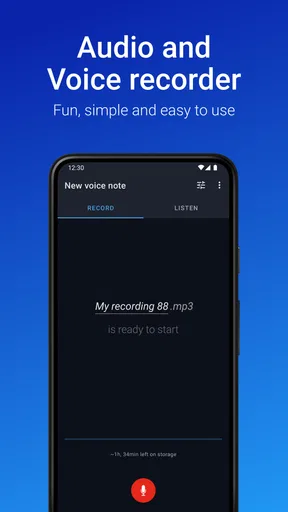
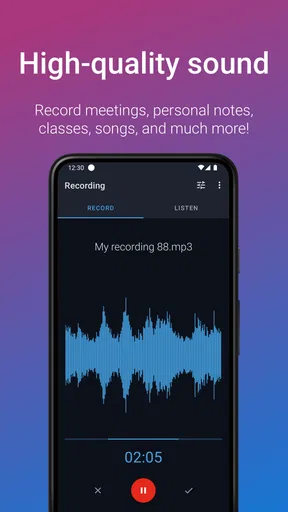
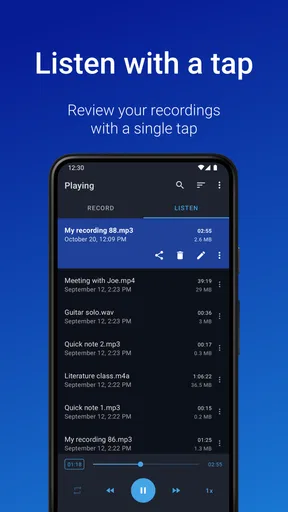
Our Review of Easy Voice Recorder Pro
 Analysis by Appyee
I often reach for a voice recorder when an idea arrives while my hands are busy, or when I need to keep a spoken explanation rather than rely on hurried notes. The useful test is not just whether recording starts quickly; it is whether I can find, share, and make sense of the audio later. Easy Voice Recorder Pro is built around that straightforward job, and its appeal is clearest when I treat it as a practical part of a note-taking routine rather than a replacement for every audio tool.
From a passing thought to a saved recording
Imagine I’m leaving a meeting and remember a task I don’t want to lose. I can open the app, record the thought, and return to it later instead of trying to type while walking. For this kind of short capture, a simple recorder is often less distracting than opening a full notes app and deciding where the information belongs. I still need to give the recording a useful name or sort through it later, but capturing the thought first keeps the moment from slipping away.
That workflow also suits students who want to revisit spoken explanations, people preparing interview questions aloud, and anyone who thinks more naturally by talking than typing. Digipom’s app is a productivity tool, and I find that description most apt when each recording has a clear purpose: preserve a detail, rehearse an idea, or make a spoken reminder that I can act on later.
Choosing the right moment to record
The quick-start approach is helpful, but a little preparation makes recordings more useful. Before a lecture or conversation, I would check that the phone is positioned where it can hear the speaker and that there is enough storage available for the session. In a meeting, I’d also make sure recording is appropriate and that everyone involved is comfortable with it. A recorder can preserve useful context, but it does not remove the need to respect people’s privacy or workplace rules.
For a long recording, I’d make a brief test first and play it back. That small check can reveal a phone placed too far away, clothing rubbing against the microphone, or a loud fan masking speech. It is a more reliable habit than assuming that a recording is clear just because the app is running. When a detail matters, a short test is worth the pause.
Keeping recordings workable after capture
Once I have several clips, the challenge changes from recording to retrieval. The app’s sorting and favorite-marking options help me distinguish the recordings I expect to revisit from incidental reminders. I’d use a consistent naming habit as well: include the topic or meeting name in the title, rather than leaving a collection of clips that all look alike. This is especially valuable when a recording needs to be found quickly during a busy day.
Skipping silence can make review less tedious when a speaker pauses often, but it is a listening convenience, not a substitute for careful playback. A pause can carry meaning, and a quiet response or a soft opening word may matter in an interview or class. I’d use the option when moving through routine material, then listen normally around a section where timing or context matters.
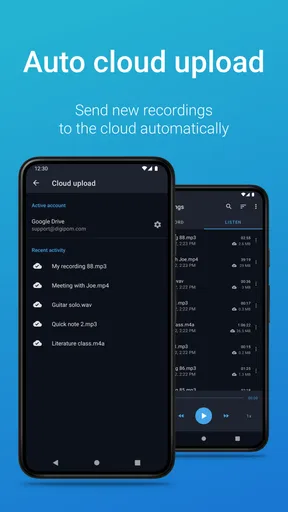
Cloud integration with Google Drive and Dropbox gives the workflow a useful handoff: recordings can be kept with other files or reached from another device. Sharing by email or messaging is handy for a short clip or a quick collaboration. Before sending audio, I’d check that I’m sharing the intended file and that it does not contain private conversation. A recording can be easy to pass along, which makes a deliberate final check important.
The Basics of Easy Voice Recorder Pro
First things first, Easy Voice Recorder Pro is exactly what it sounds like—a super user-friendly app for recording voice notes. Whether you're a student needing to capture lectures, a journalist conducting interviews, or just someone who likes to record thoughts, this app has got you covered. It's available on both Android and iOS, so no one gets left out in the cold.
Simplicity at Its Best
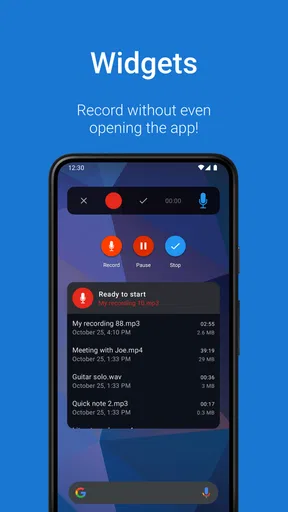
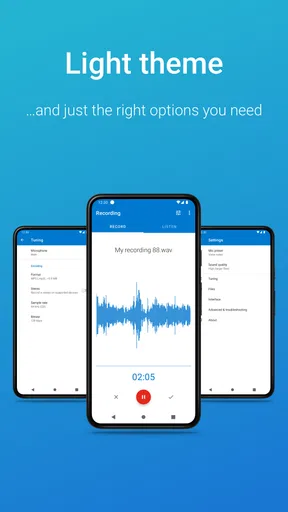
One of the standout features is just how simple it is to use. The interface is clean, intuitive, and doesn't bombard you with unnecessary options. It's all about getting straight to the point. Tap once to start recording, and you're off! The app also supports different audio formats like MP3, AAC, and WAV, which is a nice touch for those who care about audio quality.
Features That Make a Difference
While the app keeps things simple, it doesn't skimp on features. There's a nifty option to skip silence, which means you don't have to listen to long pauses when replaying your recordings. This is especially useful during interviews or lectures. Plus, organizing your recordings is a breeze with the ability to sort and mark favorites.
If you're someone who likes to keep things synced across devices, you'll love the integration with cloud services like Google Drive and Dropbox. This way, you can access your recordings anytime, anywhere. And for those moments when you need to share a recording quickly, the app makes it easy to send files via email or messaging apps.
Personal Experience with the App
I personally found the recording quality to be top-notch. Even when recording in a noisy environment, the app manages to capture clear audio, which is a huge plus. I've used it to record everything from meetings to personal notes, and it hasn't let me down yet.
Another feature that's worth mentioning is the ability to use Bluetooth microphones. This is a fantastic addition for anyone who needs to record from a distance or prefers using an external mic for better quality.
When this recorder is the better fit
I’d choose this app over a general-purpose note-taking app when the spoken detail itself matters: a lecturer’s explanation, an idea that comes faster aloud, or an interview where I want to listen again rather than trust hurried shorthand. A written note is easier to scan and edit, while audio keeps tone and wording. For a task list or a simple appointment time, though, typing a short note is usually faster to search and less cumbersome than replaying a clip.
It also sits between a phone’s most basic recording option and a dedicated audio-editing setup. The appeal here is a direct capture-and-review flow with organization and sharing tools, not a studio workflow. If I needed extensive editing, layered tracks, or detailed production controls, I would look for software designed specifically for that work. For ordinary voice capture, those extra controls can be more friction than benefit.
Real limits to plan around
Good results still depend on the recording conditions. In a crowded room, several people speaking at once, or a phone tucked into a bag, no simple recorder can make every voice equally clear. A Bluetooth microphone may help with placement or distance, but it is not a guarantee against room echo, background noise, or a weak connection. I would position the microphone close to the main speaker and do a test before relying on an important session.
Another trade-off is that a recording preserves sound, not a searchable written transcript. If I need to find one sentence in a long class or quote exact wording quickly, listening through the file takes time. I’d pair important recordings with a short written note containing the subject and the moment I need to revisit. That small habit gives me a useful pointer without turning every capture into a transcription project.
Cloud access and sharing are convenient, but they add a decision: where should the audio live, and who should receive it? For personal reminders, I may not need to share anything at all. For work or interviews, I’d consider the sensitivity of the content before moving a file to a shared location or forwarding it. The app makes handoffs practical; I still have to manage them thoughtfully.
Who I would recommend it to
At $4.99, the Pro edition makes most sense to someone who expects to record regularly and values a focused recorder with ways to organize and pass along audio. Its average rating is 4.7 from around 35,000 ratings, and it has been installed over 500,000 times. Those figures suggest broad interest, but I’d base the decision on how often I actually record: occasional users may be content with a basic recorder already on their phone, while frequent students, interviewers, and voice-note takers are more likely to appreciate a dedicated tool.
The app is rated for Everyone, and Digipom has been developing it since its release on March 26, 2012. That long presence and its straightforward purpose make it easy to understand who it serves. I’d skip it if my main need were automatic transcription, advanced sound editing, or searchable written notes; those needs call for a different kind of app. I’d also think twice if I rarely replay recordings, since a text note may be quicker for the way I work.
Personal Experience with the App
I personally found the recording quality to be top-notch. Even when recording in a noisy environment, the app manages to capture clear audio, which is a huge plus. I've used it to record everything from meetings to personal notes, and it hasn't let me down yet.
Another feature that's worth mentioning is the ability to use Bluetooth microphones. This is a fantastic addition for anyone who needs to record from a distance or prefers using an external mic for better quality.
Wrapping Up the Experience
All in all, Easy Voice Recorder Pro is a solid app that lives up to its name. It does what it promises—makes voice recording easy and accessible. Whether you're a professional needing reliable recording or just someone looking to capture everyday moments, this app is a worthy companion.
With its balance of simplicity and functionality, it's clear why it's a favorite among many users. If you're on the fence, I'd say give it a shot. You might just find it becomes an indispensable part of your daily routine. Happy recording!
Verdict
Strengths of Easy Voice Recorder Pro
- High-quality audio recording capabilities.
- Simple and intuitive user interface.
- Supports multiple audio formats.
- Background recording feature available.
- No ads for distraction-free use.
Limitations of Easy Voice Recorder Pro
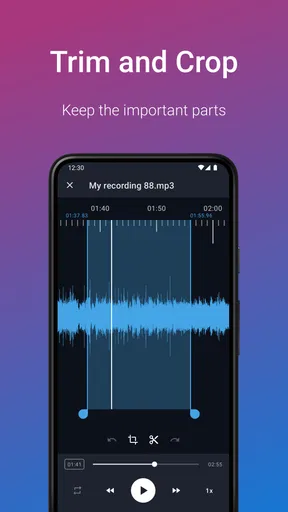
- Limited editing tools within the app.
- No cloud integration for backups.
- Requires purchase for some features.
- Limited sharing options in free version.
- Lacks advanced audio effects.
Other Releases by Digipom
View All
Easy Voice Recorder
Productivity4.7

Easy Metronome
Music & Audio4.9
Similar Picks in This Category
View All
Google Calendar
Google LLC4.6

Google Drive
Google LLC4.3

Google Assistant
Google LLC3.9

Microsoft OneDrive
Microsoft Corporation4.6

Samsung Calendar
Samsung Electronics Co., Ltd.4.1

Microsoft OneNote: Save Notes
Microsoft Corporation4.6
Frequently Asked Questions
What features does Easy Voice Recorder Pro offer?
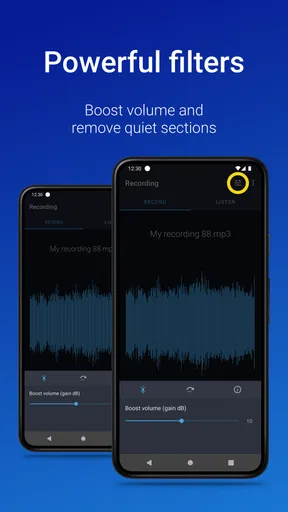
Easy Voice Recorder Pro provides a range of features for high-quality audio recording. Users can enjoy options like stereo recording, support for various file formats such as MP3 and WAV, and the ability to control gain and skip silence. The app also supports cloud integration for easy sharing and storage.
Is Easy Voice Recorder Pro suitable for professional use?
Yes, Easy Voice Recorder Pro is designed for both casual and professional use. It offers advanced features such as customizable audio quality settings and background recording, making it ideal for professionals needing reliable recording solutions for meetings, lectures, or music sessions.
How does Easy Voice Recorder Pro handle file management?
The app provides an intuitive file management system. Users can easily organize recordings by naming them, adding notes, and using folders. Additionally, recordings can be shared directly through email or uploaded to cloud services like Google Drive and Dropbox, facilitating easy access and collaboration.
Does Easy Voice Recorder Pro have any limitations or drawbacks?
While Easy Voice Recorder Pro is feature-rich, some users may find the interface slightly overwhelming at first due to the variety of options. Additionally, the app's advanced features might require a learning curve for users unfamiliar with audio recording technology. However, once accustomed, it proves highly efficient.
What are the system requirements for Easy Voice Recorder Pro?
Easy Voice Recorder Pro is available on both Android and iOS platforms. For optimal performance, ensure your device runs on Android 5.0 or later, or iOS 11.0 or later. The app is lightweight, but adequate storage space is necessary for saving high-quality audio files, especially longer recordings.
